Both
Facebook's Android app
as well as
Facebook's iOS app use a so-called in-app browser,
sometimes also referred to as IAB.
The core argument for using an in-app browser (instead of the user's default browser)
is to keep users in the app and to enable closer app integration patterns
(like "quote from a page in a new Facebook post"), while making others harder or even impossible
(like "share this link to Twitter").
Technically, IABs are implemented as
WebViews on Android,
respectively as
WKWebViews on iOS.
To simplify things, from hereon, I will refer to both simply as WebViews.
In-App Browsers are less capable than real browsers ⚓
Turns out, WebViews are rather limited compared to real browsers like Firefox, Edge, Chrome, and to some extent also Safari. In the past, I have done some research on their limitations when it comes to features that are important in the context of Progressive Web Apps. The linked paper has all the details, but you can simply see for yourself by opening the 🕵️ PWA Feature Detector app that I have developed for this research in your regular browser, and then in a WebView like Facebook's in-app browser (you can share the link visible to just yourself on Facebook and then click through, or try to open my post in the app).
In-App Browsers can modify webpages ⚓
On top of limited features, WebViews can also be used for effectively conducting intended man-in-the-middle attacks, since the IAB developer can arbitrarily inject JavaScript code and also intercept network traffic. Most of the time, this feature is used for good. For example, an airline company might reuse the 💺 airplane seat selector logic on both their native app as well as on their Web app. In their native app, they would remove things like the header and the footer, which they then would show on the Web (this is likely the origin of the CSS can kill you meme).
If you build an IAB, don't use a WebView ⚓
For these reasons, people like Alex Russell—whom
you should definitely follow—have been advocating against WebView-based IABs.
Instead, you should wherever possible use
Chrome Custom Tabs on Android,
or the iOS counterpart
SFSafariViewController.
Alex writes:
Note that responsible native apps have a way of creating an "in app browser" that doesn't subvert user choice or break the web:
https://developer.chrome.com/multidevice/android/customtabs
Any browser can implement the protocol & default browser will be used. FB can enable this with their next update.
If you have to use a WebView-based IAB, mark it debuggable ⚓
Alex has been telling people for a long time that they should mark their WebView-based IABs debuggable. The actual code for that is a one-liner:
if (Build.VERSION.SDK_INT >= Build.VERSION_CODES.KITKAT) {
    WebView.setWebContentsDebuggingEnabled(true);
}
Looking into Facebook's IAB ⚓
The other day, I learned with great joy that Facebook finally have marked their IAB debuggable 🎉. Patrick Meenan—whom you should likewise follow and whom you might know from the amazing WebPageTest project—writes in a Twitter thread:
You can now remote-debug sites in the Facebook in-app browser on Android. It is enabled automatically so once your device is in dev mode with USB debugging and a browser open just visit chrome://inspect to attach to the WebView.
The browser (on iOS and Android) is just a WebView so it should behave mostly like Chrome and Safari but it adds some identifiers to the UA string which sometimes causes pages that UA sniff to break.
Finally, if your analytics aren't breaking out the in-app browsers for you, I highly recommend you see if it is possible to enable. You might be shocked at how much of your traffic comes from an in-app browser (odds are it is the 3rd most common browser behind Chrome and Safari).
I have thus followed up on the invitation and had a closer look at their IAB by inspecting
example.org and also a simple test page
facebook-debug.glitch.me that contains the
debugger
statement in its head.
I have linked a debug trace 📄 that you can open for yourself
in the Performance tab of the Chrome DevTools.
User-Agent String ⚓
As pre-announced by Patrick, Facebook's IAB changes the user-agent string.
The
default WebView user-agent string
looks something like Mozilla/5.0 (Linux; Android 5.1.1; Nexus 5 Build/LMY48B; wv) AppleWebKit/537.36 (KHTML, like Gecko) Version/4.0 Chrome/43.0.2357.65 Mobile Safari/537.36
Facebook's IAB browser currently sends this:
navigator.userAgent
// "Mozilla/5.0 (Linux; Android 10; Pixel 3a Build/QQ2A.191125.002; wv) AppleWebKit/537.36 (KHTML, like Gecko) Version/4.0 Chrome/78.0.3904.108 Mobile Safari/537.36 [FB_IAB/FB4A;FBAV/250.0.0.14.241;]"
Compared to the default user-agent string, the identifying bit is the suffix [FB_IAB/FB4A;FBAV/250.0.0.14.241;].
Added window properties ⚓
Facebook's IAB adds two new properties to window, with the values 0 and 1.
window.TEMPORARY
// 0
window.PERSISTENT
// 1
Added window object ⚓
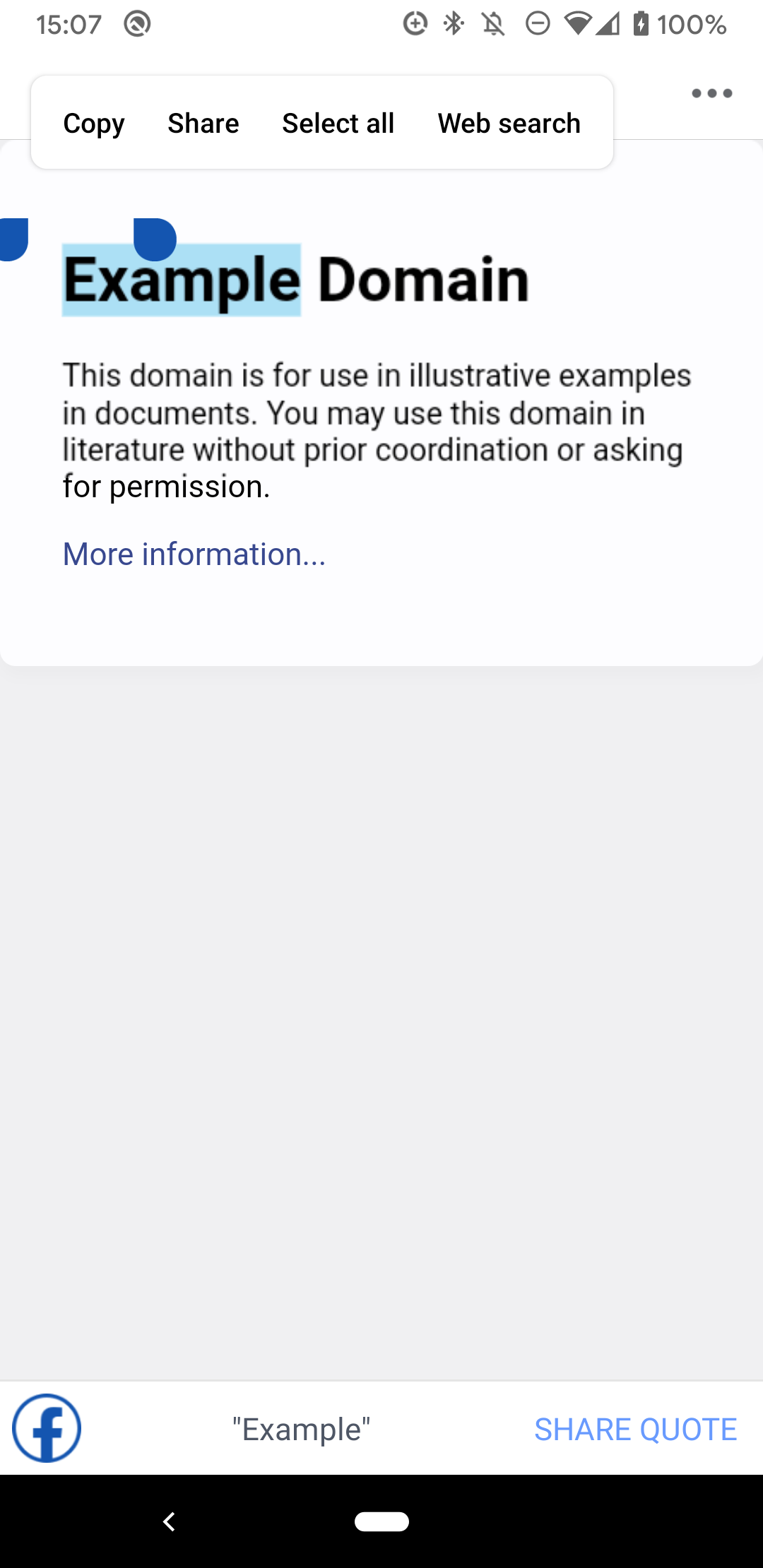
Facebook further adds a new window object FbQuoteShareJSInterface.
document.onselectionchange = function() {
  window.FbQuoteShareJSInterface.onSelectionChange(
    window.getSelection().toString(),
    window.location.href
  );
};
This code is used for the "share quote" feature that allows users to mark text on a page to share.
Performance monitoring and feature detection ⚓
Facebook runs some performance monitoring via the
Performance interface.
This is split up in two scripts, each of which they seem to run three times.
They also check if a given page is using AMP
by checking for the presence of the amp or ⚡️ attribute on <html>.
void (function() {
  try {
    if (window.location.href === "about:blank") {
      return;
    }
    if (
      !window.performance ||
      !window.performance.timing ||
      !document ||
      !document.body ||
      document.body.scrollHeight <= 0 ||
      !document.body.children ||
      document.body.children.length < 1
    ) {
      return;
    }
    var nvtiming__fb_t = window.performance.timing;
    if (nvtiming__fb_t.responseEnd > 0) {
      console.log("FBNavResponseEnd:" + nvtiming__fb_t.responseEnd);
    }
    if (nvtiming__fb_t.domContentLoadedEventStart > 0) {
      console.log(
        "FBNavDomContentLoaded:" + nvtiming__fb_t.domContentLoadedEventStart
      );
    }
    if (nvtiming__fb_t.loadEventEnd > 0) {
      console.log("FBNavLoadEventEnd:" + nvtiming__fb_t.loadEventEnd);
    }
    var nvtiming__fb_html = document.getElementsByTagName("html")[0];
    if (nvtiming__fb_html) {
      var nvtiming__fb_html_amp =
        nvtiming__fb_html.hasAttribute("amp") ||
        nvtiming__fb_html.hasAttribute("\u26A1");
      console.log("FBNavAmpDetect:" + nvtiming__fb_html_amp);
    }
  } catch (err) {
    console.log("fb_navigation_timing_error:" + err.message);
  }
})();
// FBNavResponseEnd:1575904580720
// FBNavDomContentLoaded:1575904586057
// FBNavAmpDetect:falsedocument.addEventListener("DOMContentLoaded", event => {
console.info(
"FBNavDomContentLoaded:" +
window.performance.timing.domContentLoadedEventStart
);
});
// FBNavDomContentLoaded:1575904586057Feature Policy tests ⚓
They run some Feature Policy
tests via a function named getFeaturePolicyAllowListOnPage().
You can see the documentation for the tested
directives
on the Mozilla Developer Network.
(function() {
  function getFeaturePolicyAllowListOnPage(features) {
    const map = {};
    const featurePolicy = document.policy || document.featurePolicy;
    for (const feature of features) {
      map[feature] = {
        allowed: featurePolicy.allowsFeature(feature),
        allowList: featurePolicy.getAllowlistForFeature(feature)
      };
    }
    return map;
  }
  const allPolicies = [
    "geolocation",
    "midi",
    "ch-ect",
    "execution-while-not-rendered",
    "layout-animations",
    "vertical-scroll",
    "forms",
    "oversized-images",
    "document-access",
    "magnetometer",
    "picture-in-picture",
    "modals",
    "unoptimized-lossless-images-strict",
    "accelerometer",
    "vr",
    "document-domain",
    "serial",
    "encrypted-media",
    "font-display-late-swap",
    "unsized-media",
    "ch-downlink",
    "ch-ua-arch",
    "presentation",
    "xr-spatial-tracking",
    "lazyload",
    "idle-detection",
    "popups",
    "scripts",
    "unoptimized-lossless-images",
    "sync-xhr",
    "ch-width",
    "ch-ua-model",
    "top-navigation",
    "ch-lang",
    "camera",
    "ch-viewport-width",
    "loading-frame-default-eager",
    "payment",
    "pointer-lock",
    "focus-without-user-activation",
    "downloads-without-user-activation",
    "ch-rtt",
    "fullscreen",
    "autoplay",
    "execution-while-out-of-viewport",
    "ch-dpr",
    "hid",
    "usb",
    "wake-lock",
    "ch-ua-platform",
    "ambient-light-sensor",
    "gyroscope",
    "document-write",
    "unoptimized-lossy-images",
    "sync-script",
    "ch-device-memory",
    "orientation-lock",
    "ch-ua",
    "microphone"
  ];
  return getFeaturePolicyAllowListOnPage(allPolicies);
})();
Not all directives are currently supported by the WebView, so a number of warnings are logged.
The recognized ones (i.e., the output of the getFeaturePolicyAllowListOnPage() function above)
result in an object as follows.
{
  "geolocation": {
    "allowed": true,
    "allowList": [
      "https://example.com"
    ]
  },
  "midi": {
    "allowed": true,
    "allowList": [
      "https://example.com"
    ]
  },
  "ch-ect": {
    "allowed": false,
    "allowList": []
  },
  "execution-while-not-rendered": {
    "allowed": false,
    "allowList": []
  },
  "layout-animations": {
    "allowed": false,
    "allowList": []
  },
  "vertical-scroll": {
    "allowed": false,
    "allowList": []
  },
  "forms": {
    "allowed": false,
    "allowList": []
  },
  "oversized-images": {
    "allowed": false,
    "allowList": []
  },
  "document-access": {
    "allowed": false,
    "allowList": []
  },
  "magnetometer": {
    "allowed": true,
    "allowList": [
      "https://example.com"
    ]
  },
  "picture-in-picture": {
    "allowed": true,
    "allowList": [
      "*"
    ]
  },
  "modals": {
    "allowed": false,
    "allowList": []
  },
  "unoptimized-lossless-images-strict": {
    "allowed": false,
    "allowList": []
  },
  "accelerometer": {
    "allowed": true,
    "allowList": [
      "https://example.com"
    ]
  },
  "vr": {
    "allowed": true,
    "allowList": [
      "https://example.com"
    ]
  },
  "document-domain": {
    "allowed": true,
    "allowList": [
      "*"
    ]
  },
  "serial": {
    "allowed": false,
    "allowList": []
  },
  "encrypted-media": {
    "allowed": true,
    "allowList": [
      "https://example.com"
    ]
  },
  "font-display-late-swap": {
    "allowed": false,
    "allowList": []
  },
  "unsized-media": {
    "allowed": false,
    "allowList": []
  },
  "ch-downlink": {
    "allowed": false,
    "allowList": []
  },
  "ch-ua-arch": {
    "allowed": false,
    "allowList": []
  },
  "presentation": {
    "allowed": false,
    "allowList": []
  },
  "xr-spatial-tracking": {
    "allowed": false,
    "allowList": []
  },
  "lazyload": {
    "allowed": false,
    "allowList": []
  },
  "idle-detection": {
    "allowed": false,
    "allowList": []
  },
  "popups": {
    "allowed": false,
    "allowList": []
  },
  "scripts": {
    "allowed": false,
    "allowList": []
  },
  "unoptimized-lossless-images": {
    "allowed": false,
    "allowList": []
  },
  "sync-xhr": {
    "allowed": true,
    "allowList": [
      "*"
    ]
  },
  "ch-width": {
    "allowed": false,
    "allowList": []
  },
  "ch-ua-model": {
    "allowed": false,
    "allowList": []
  },
  "top-navigation": {
    "allowed": false,
    "allowList": []
  },
  "ch-lang": {
    "allowed": false,
    "allowList": []
  },
  "camera": {
    "allowed": true,
    "allowList": [
      "https://example.com"
    ]
  },
  "ch-viewport-width": {
    "allowed": false,
    "allowList": []
  },
  "loading-frame-default-eager": {
    "allowed": false,
    "allowList": []
  },
  "payment": {
    "allowed": false,
    "allowList": []
  },
  "pointer-lock": {
    "allowed": false,
    "allowList": []
  },
  "focus-without-user-activation": {
    "allowed": false,
    "allowList": []
  },
  "downloads-without-user-activation": {
    "allowed": false,
    "allowList": []
  },
  "ch-rtt": {
    "allowed": false,
    "allowList": []
  },
  "fullscreen": {
    "allowed": true,
    "allowList": [
      "https://example.com"
    ]
  },
  "autoplay": {
    "allowed": true,
    "allowList": [
      "https://example.com"
    ]
  },
  "execution-while-out-of-viewport": {
    "allowed": false,
    "allowList": []
  },
  "ch-dpr": {
    "allowed": false,
    "allowList": []
  },
  "hid": {
    "allowed": false,
    "allowList": []
  },
  "usb": {
    "allowed": true,
    "allowList": [
      "https://example.com"
    ]
  },
  "wake-lock": {
    "allowed": false,
    "allowList": []
  },
  "ch-ua-platform": {
    "allowed": false,
    "allowList": []
  },
  "ambient-light-sensor": {
    "allowed": true,
    "allowList": [
      "https://example.com"
    ]
  },
  "gyroscope": {
    "allowed": true,
    "allowList": [
      "https://example.com"
    ]
  },
  "document-write": {
    "allowed": false,
    "allowList": []
  },
  "unoptimized-lossy-images": {
    "allowed": false,
    "allowList": []
  },
  "sync-script": {
    "allowed": false,
    "allowList": []
  },
  "ch-device-memory": {
    "allowed": false,
    "allowList": []
  },
  "orientation-lock": {
    "allowed": false,
    "allowList": []
  },
  "ch-ua": {
    "allowed": false,
    "allowList": []
  },
  "microphone": {
    "allowed": true,
    "allowList": [
      "https://example.com"
    ]
  }
}
HTTP headers ⚓
I checked the response and request headers, but nothing special stood out.
The only remarkable thing given that they look at Feature Policy is the absence of the
Feature-Policy header.
Request header ⚓
:authority: facebook-debug.glitch.me
:method: GET
:path: /
:scheme: https
accept: text/html,application/xhtml+xml,application/xml;q=0.9,image/webp,image/apng,*/*;q=0.8,application/signed-exchange;v=b3
accept-encoding: gzip, deflate
accept-language: en-US,en;q=0.9,de-DE;q=0.8,de;q=0.7,ca-ES;q=0.6,ca;q=0.5
cache-control: no-cache
pragma: no-cache
referer: http://m.facebook.com/
sec-fetch-mode: navigate
sec-fetch-site: none
sec-fetch-user: ?1
upgrade-insecure-requests: 1
user-agent: Mozilla/5.0 (Linux; Android 10; Pixel 3a Build/QQ2A.191125.002; wv) AppleWebKit/537.36 (KHTML, like Gecko) Version/4.0 Chrome/78.0.3904.108 Mobile Safari/537.36 [FB_IAB/FB4A;FBAV/250.0.0.14.241;]
x-requested-with: com.facebook.katana
Response header ⚓
accept-ranges: bytes
cache-control: max-age=0
content-length: 527
content-type: text/html; charset=utf-8
date: Mon, 09 Dec 2019 15:23:40 GMT
etag: W/"20f-16eeb283880"
last-modified: Mon, 09 Dec 2019 14:55:12 GMT
status: 200
vary: Origin
Conclusion ⚓
All in all, these are all the things Facebook did that I could observe
on the pages that I have tested.
I didn't notice any click listeners or scroll listeners
(that could be used for engagement tracking of Facebook users with the pages they browse on)
or any other kind of "phoning home" functionality,
but they could of course have implemented this natively
via the WebView's
View.OnScrollChangeListener
or
View.OnClickListener,
as they
did
for long clicks for the FbQuoteShareJSInterface.
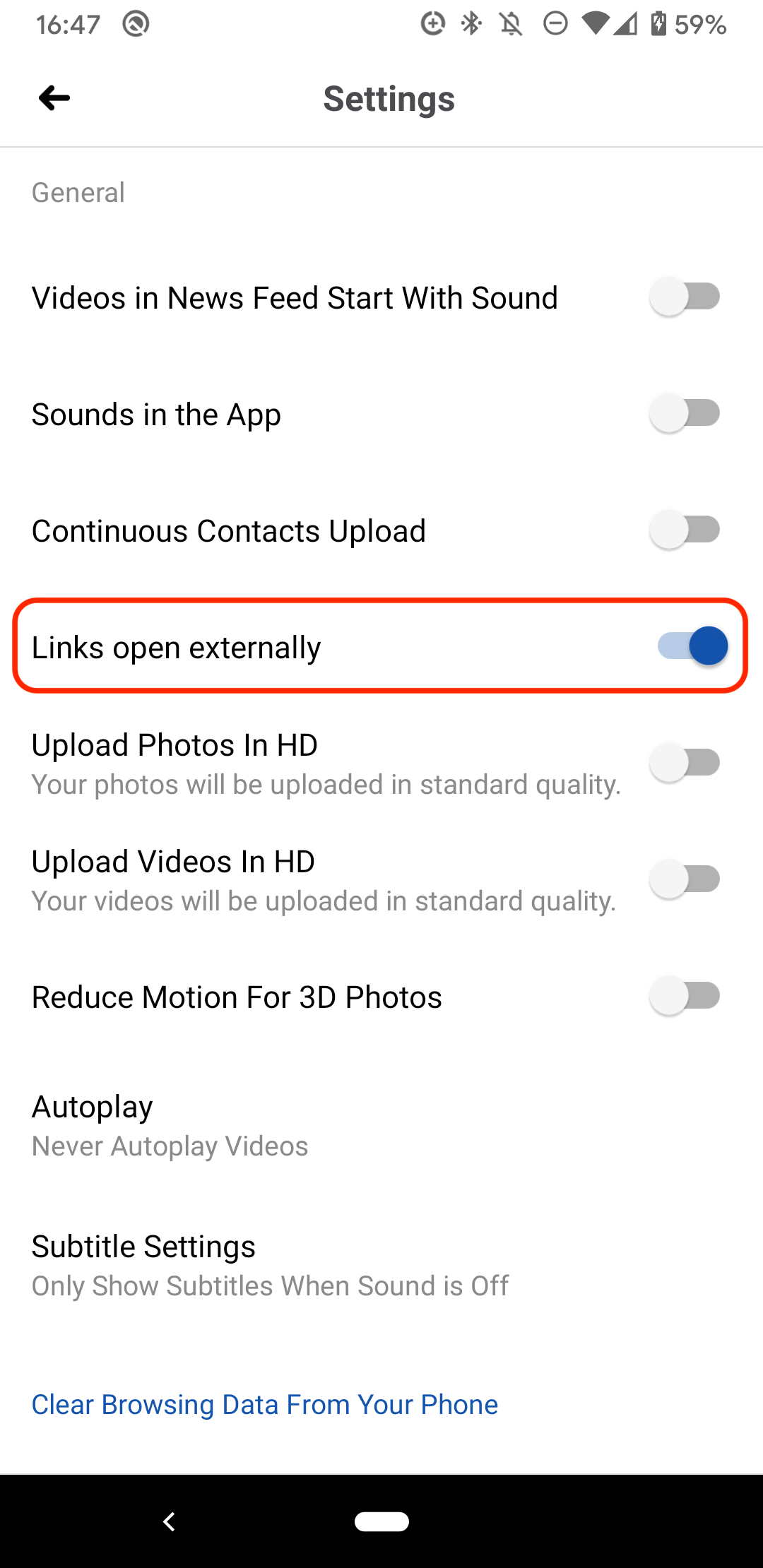
That being said, if after reading this you prefer your links to open in your default browser,
it's well hidden, but definitely possible: Settings > Media and Contacts > Links open externally.
It goes without saying, but just in case: all code snippets in this post are owned by and copyright of Facebook.
Did you run a similar analysis with similar (or maybe different) findings? Let me know on Twitter or Mastodon by posting your thoughts with a link to this post. It will then show up as a Webmention at the bottom. On supporting platforms, you can simply use the "Share Article" button below.
This post appeared first on https://blog.tomayac.com/2019/12/09/inspecting-facebooks-webview/.